
Step-by-step Guide to Wall-mounting Your TV
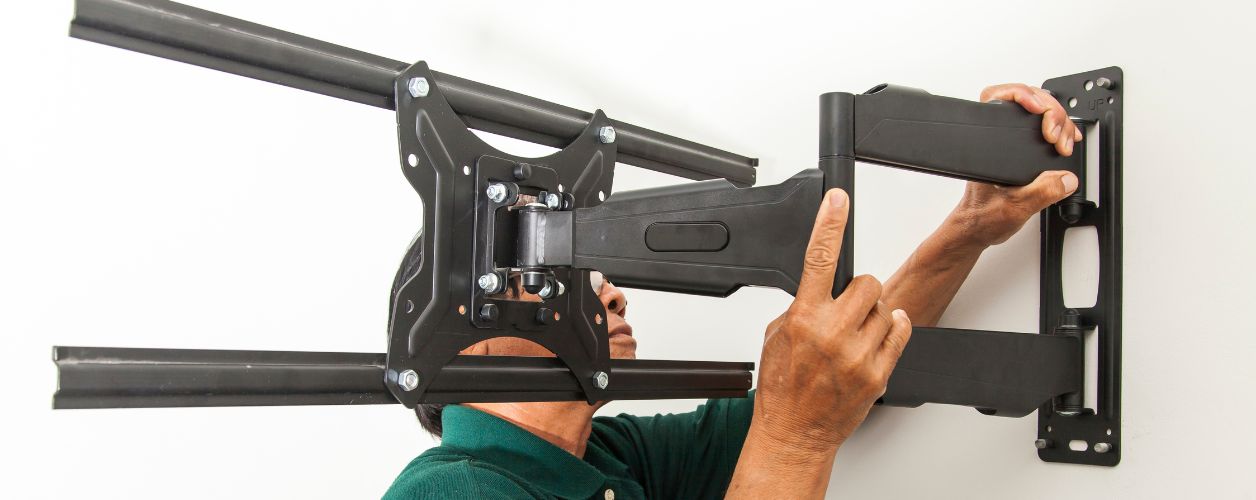
Table Of Content
- Introduction
- Why Wall-mounting a TV is Worth It
- Preparing for the Mounting Process
- Types of TV Wall Mounts
- Step-by-step Process: How to Wall Mount a TV
- Cable Management for a Professional Look
- Mistakes to Avoid When Mounting Your TV
- TV Wall Mounting Safety Guidelines
- Accessories to Enhance Your Setup
- Difference between DIY and Professional Installation
- Tips for Building the Perfect Entertainment Setup
- Long-term Maintenance After Installation
- Conclusion
Hanging a TV is one of those projects capable of transforming the aesthetic value of your living space. The placement substituted that bulky floor stand with something sleek and modern that borders on a movie screen look. Although the appeal is there, many individuals fail to come forward since they lack confidence in how to do it. That’s where a detailed TV mounting guide comes in handy. If you’ve ever wondered exactly how to wall mount a TV without damaging your screen or wall, this blog will give you everything you need in clear, practical steps.
Why Wall-mounting a TV is Worth It
Aesthetic Advantages
A TV on the wall immediately renders the room in good condition and modern. By shunning the use of a big cabinet or a stand, you create more space and focus more attention on the TV itself, the centrepiece of the entertainment area.
Practical Benefits
When you install a TV on the wall, you reduce the risk of accidental knocks, especially in homes with kids or pets. You, too, have an improved viewing posture since you can vary the height and angle of your positioning.
Long-term Value
A TV setup in the wall is not only aesthetically pleasing, but it is also convenient and long-lasting. Proper cable management and the correct mount make the television safer, secure and easy to maintain even over the years.
Preparing for the Mounting Process
Gathering the Right Tools
The first step in any TV mounting guide is preparation. Items you will require include a stud finder, drill, screw drivers, measuring tape, and level, lag bolts and lastly the mount. It is also suggested that a socket wrench, safety goggles and cable ties be used.
Choosing the Wall
Not all walls can be mounted on. The most popular option is drywall with studs, whereas it is necessary to use special anchors on the brick or concrete walls. Do not mount your television on top of fireplaces without the exception of insulation of the wall against heat.
Deciding the Height
To be comfortable, the screen centre should be at the seated eye level. In the majority of live rooms, the centre-of-screen to floor dimension is forty-eight to forty-two inches. Bedrooms should be a little higher based on the viewing position of the bed.
Types of TV Wall Mounts
Fixed Mounts
These are narrow and bring the television near the wall. It is best suited to a minimalist style and has no adjustability in terms of angle.
Tilting Mounts
The tilting mounts give you the ability to tilt the TV up or down. They come in handy when there is a slightly higher TV fixation or to minimise the glare.
Full-motion Mounts
The articulating mounts enable you to extend the TV, swivel it, and/or tilt it in several directions. It is most suitable in bigger rooms, or when the furniture is distributed.
Ceiling Mounts
Not too common but handy in distinct rooms, these will allow the TV to hang from the ceiling.
Step-by-step Process: How to Wall Mount a TV
- Mark and Measure: To begin with, identify the position on the wall that one would want to use. Measure the height and the levelling with a tape measure and level so that straightness is maintained. Identify the stud positions by use of a studio finder and place marks at the centres.
- Attach the Bracket to the TV: Put the television on a soft surface face downwards. Find the hole line on the back that is compatible with the bracket and screw through using the bolts, which come with your kit. Make them tight but not too tight.
- Install the Wall Plate: Apply the wall plate to the wall, where you have made your marks. Drill pilot holes in the studs, and place the plate with lag screws. Use a level to determine that it is straight.
- Fit the television to the Wall Plate: Lift the TV with help and hook it to the wall plate. This can be performed using a slide, a lock or a clip, depending on the mount. Check that it slides or locks on nicely and firmly.
- Cable Connections and Management: Insert the required cables, pen drives or wires in the TV before it is pressed against the wall. Cable tie, sleeve or in-wall management kit to organise them with a clean finish.
Cable Management for a Professional Look
Surface-level Options
Raceways and cord covers can hide cables along the wall. They are paintable to your wall colour so that it looks seamless.
In-wall Solutions
To put a more refined touch, in-wall cable management systems conceal all these cables. This is an extra effort, but it will yield the most cleansing result.
Wireless Alternatives
Other devices can support wireless displaying (through the HDMI protocol) or streaming, to reduce the number of hardware connection requirements. Although they do not provide a total substitute, such innovations can reduce stand-out clutter.
Mistakes to Avoid When Mounting Your TV
Even with a TV mounting guide, beginners often make mistakes. Here is a list of some of the most common ones to watch out for:
- Failure to drill into studs or to use an appropriate anchor, which predisposes the fall of the TV.
- Forming the TV to be too high causes hard viewing angles.
- Failing to use a level that makes the screen crooked.
- Too much force on the screws may strip off or bend the mount.
- Bad cable planning that results in droopy-looking wires.
TV Wall Mounting Safety Guidelines
Safety should always be a priority when you install a TV on the wall. Here are some of the guidelines:
- Always use insulated gloves to move the TV to avoid injury and damage to the TV.
- Put on goggles when drilling to guard your eyes.
- Get help for lifting the TV.
- Verify the capacity of the mount you are buying with the weight of the television.
- Do not drill where there is electrical wiring or plumbing present.
- Until the TV has been secured, all children and pets should be kept out of the installation.
Accessories to Enhance Your Setup
Once you know how to wall mount a TV, you can personalise your setup with accessories:
- Soundbar mounts: Adjust the speakers under the television to synchronise them.
- Floating shelves: Place the floating shelves to store objects that might otherwise crowd a shelf, such as gaming units or set-top boxes.
- LED backlighting: Provide a cinematic perspective by installing a light behind the television.
- Surge protectors: Protect your gear against power surges.
- Universal remotes: Reduce the problem of having to control multiple devices.
Difference between DIY and Professional Installation
For many people, following a detailed TV mounting guide makes DIY installation manageable. It is cost-efficient and gives the gratification of having done the job yourself.
Nevertheless, it is professional services that provide a fine touch, particularly in the case of heavy televisions, non-standard walls, and complicated wiring.
The choice will be dependent on your familiarity with tools and the size of your television, and your free time.
Tips for Building the Perfect Entertainment Setup
Sound System Integration
A TV installed on brackets goes well with a well-positioned sound system. Wall-mount or floor-standing speakers will help to complete the audio sound. A soundbar underneath the TV is a rather basic but effective addition.
Lighting Considerations
Keep away from excessive harsh overhead lighting that causes glare on the screen. To cope with eyestrain, use dimmable LED lights, floor lamps, or LED stripes on the backside of the television to create a soft backlight that will increase viewing ease.
Furniture Arrangement
Seat occupants in such a way that each can view the screen clearly. Sectional furniture or a recliner allows one to cover a more intimate theatre-like setting.
Smart Accessories
Use streaming devices, universal remotes or voice assistants to bring added functionality to your entertainment area. Energy management can also be complicated by using Smart plugs and Power strips.
Aesthetic Touches
To balance the mounted TV on the wall, use minimal frames or shelves, and plants on the wall. The idea is to come up with a setup that feels trendy and comfortable.
Long-term Maintenance After Installation
After you successfully install the TV on the wall, ongoing care is simple.
- Keep the screen spotlessly clean by wiping it with a microfiber cloth.
- Examine the mount periodically to make sure the bolts are secure.
- Never jerk the cables when inserting or removing them.
- Recheck the ventilation around the TV to avoid overheating.
All these recommendations will help to keep your setup secure, well-hygienic, and working for a long time.
Conclusion
To many, the idea of wall-mounting a television may seem like a daunting task at first, but with proper planning and a bit of step-by-step instructions, it becomes a personal project that any homeowner can tackle. This detailed TV mounting guide has walked you through everything from preparation and choosing the right mount to installation, cable management, safety, and enhancing the setup with accessories you can always hire expert appliance technicians.